AI OnlyFans Model: What Works in 2026
OnlyFans now removes wholly AI-generated accounts. So on OnlyFans you post labeled AI content of yourself, and an original AI model runs on Fanvue or MYM. Here's how both work.
What is an AI OnlyFans model?
The term usually means an original AI-generated persona, a face and body that belong to no real person, selling subscriptions and pay-per-view. That persona can't run on OnlyFans anymore. Under the Terms of Use updated in October 2026, AI content there must clearly feature the verified creator and carry an #ai label, and the Help Centre lists wholly AI-generated accounts as content you cannot share. So in practice it means one of two things: AI content of yourself, the verified creator, on OnlyFans, or an original AI model on Fanvue or MYM, which allow AI accounts with an AI label.
How to create an AI model, and where it can post
Four steps separate a blank page from a model that posts. The condensed version is below; the full step-by-step guide covers each in depth.
Design the persona
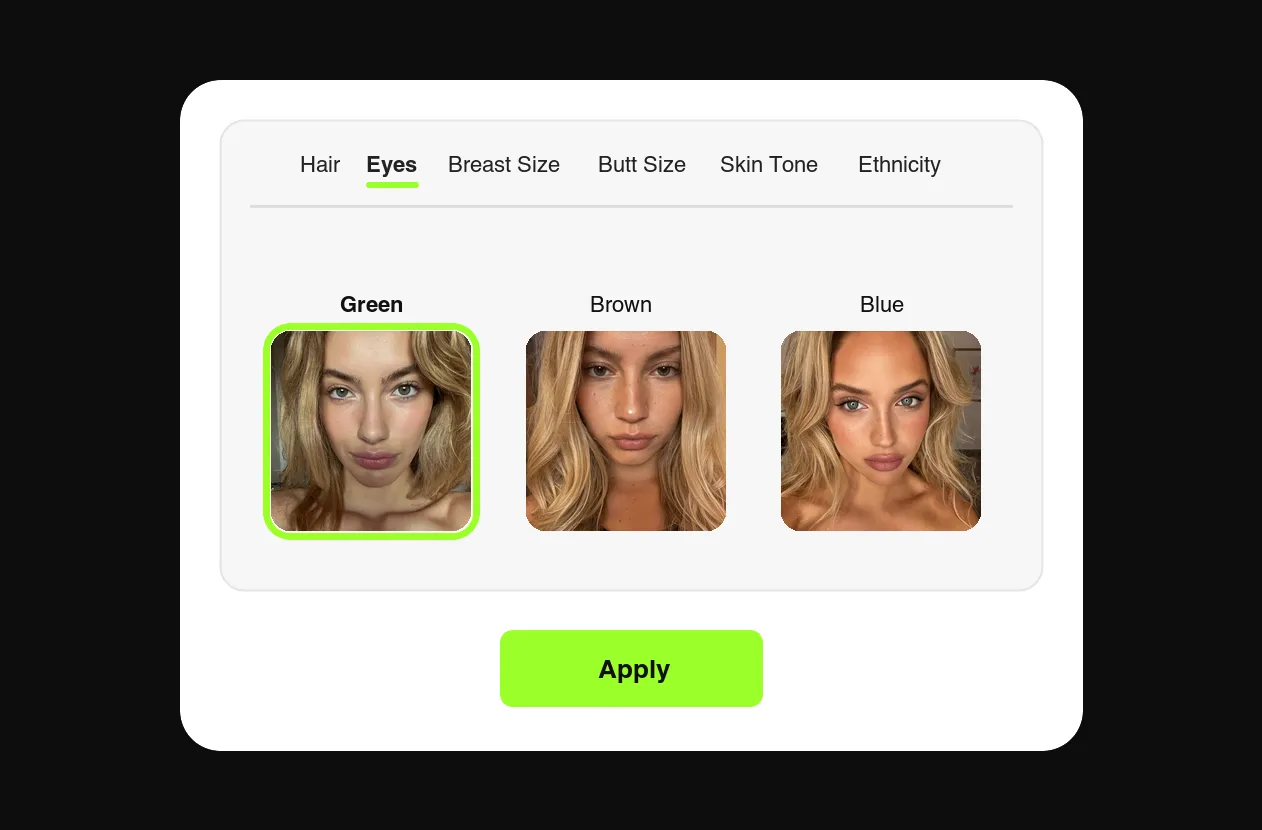
Build her in the generator: hair, eyes, body composition, ethnicity, skin tone. Original face only — never generate from a real person.
Generate the content library
Prompt two to three weeks of photos and videos before launch — feed posts, PPV sets, teasers. Same face in every frame.
Open the accounts
Fanvue or MYM for revenue, verified under you as the operator, with the AI label each platform asks for. Not OnlyFans, which removes wholly AI-generated accounts, and not Fansly, which bans photorealistic AI even when labeled. Instagram, TikTok and X for reach. The rules are on our policy page.
Post on schedule and sell
Daily socials, several Fanvue or MYM posts a week, PPV in the DMs. You download every piece in per-platform formats and post it yourself, so a week of posts is one batch.
The AI OnlyFans model generator
You don't need a separate "model generator" tool — creating the model and producing her content is one workflow. FansCreator locks the persona you design, then renders every photo and video in her exact likeness, NSFW included, at up to full resolution. Searching for a generator and searching for a model end at the same place: one consistent girl with an endless library.
Already a verified OnlyFans creator? The same workflow runs on your own likeness: new photos and videos of you, without a shoot. Label each one #ai and keep it clearly you, and it's the kind of AI content OnlyFans allows.
The rules, platform by platform
The short version. The OnlyFans clauses are quoted in full on our OnlyFans AI content policy page, with the Fanvue, MYM and Fansly rules next to them:
- OnlyFans: AI content must clearly feature you, the verified creator, with a signifier such as #ai or #AIGenerated. The Help Centre lists "accounts or content that are wholly AI-generated" as content you cannot share, so an original AI model does not belong there.
- Fanvue: fully AI creators are a verified category. You verify as the operator, disclose clearly, and the profile shows an AI tag.
- MYM: AI content is allowed if labeled "Virtual Image", #AI or #AIgenerated, and MYM marks the account with an "AI profile" badge.
- Fansly: no photorealistic AI at all, face swaps included, even when labeled.
- Everywhere: the model's face is original. AI content of a real person without their consent is banned on all of these platforms.
Follow the rules of the platform you post on. FansCreator never posts for you: you download and publish everything yourself, so nothing reaches an account without you.
Create Your AI Model
Design her tonight, launch her on Fanvue or MYM this week. Free plan, no card required.
AI OnlyFans Model FAQ
Can an AI model make money on OnlyFans?
Not a wholly AI one. Since the October 2026 Terms of Use, OnlyFans only allows AI content that clearly features the verified creator, and it removes wholly AI-generated accounts. An original AI model earns on Fanvue or MYM through the same channels: subscriptions, pay-per-view messages and custom requests. On OnlyFans, AI earns for you when the content is of you, labeled #ai.
Is an AI OnlyFans model allowed?
Not as an original AI persona. The OnlyFans Terms of Use (October 2026) allow AI content only if "it clearly features the verified Creator" and carries "a signifier such as #ai, or #AIGenerated", and the Help Centre lists "accounts or content that are wholly AI-generated" as content you cannot share. AI content of yourself, labeled, is allowed. The exact clauses are quoted on our policy page.
How do I create an AI model for OnlyFans?
On OnlyFans the model has to be you: generate AI content of yourself and label it #ai. For an original AI model, design the persona, generate a content library, open a Fanvue or MYM account and post on schedule. The step-by-step guide walks through all four steps with screenshots.
Can I run multiple AI models?
Yes, on Fanvue and MYM. That's the agency playbook: a second model in a different niche costs prompts, not photoshoots. The Basic plan covers five creators and Pro covers unlimited creators; see pricing.
Do subscribers know the model is AI?
Yes. Fanvue shows an AI tag on every AI creator's profile, and MYM adds an "AI profile" badge and asks for "Virtual Image", #AI or #AIgenerated on posts. On OnlyFans, AI content of yourself carries #ai or #AIGenerated. Disclosure is part of the format, and subscribers follow AI models for consistency and fantasy anyway.
Do I need to use my own face or body?
On OnlyFans, yes: AI content there must clearly feature you, the verified creator. On Fanvue and MYM, no: an original AI model can run there, with you verified as the operator and the AI label in place.